Showing posts with label lesson plan. Show all posts

I Wanna Iguana and Persuasive Paragraphs

Saturday, February 28, 2015


We have been reviewing different types of writing this week.  We reviewed the important ingredients for good paragraph writing, and have been using organizers to make sure that the paragraphs are strongly written.  We finished up the week with a lesson on persuasive writing and the book I Wanna Iguana by Karen Kaufman Orloff


I Wanna Iguana is the story of Alex and his desire for a baby iguana.  The story is told through notes that Alex and his mother write back and forth to each other about why he should or shouldn’t have the iguana.  The kids loved the story (even though it’s a pretty simple picture book).

After reading the book, we talked about the reasons Alex gave for wanting the new pet, and connected that to persuasive writing.  Then it was organizer time.  I found an organizer based on the hamburger model which is available here.  I explained what “elaborate” means and how it adds detail to their writing and makes it sound more sophisticated (which required a definition, too).


Then the kids got started planning and writing.  Their topic was “Ask your parents for something extravagant” in a way similar to Alex in the story we read.  I told them it could be as extravagant as they could imagine.  Students are asking for cars, phones, mythological creatures, and fancy vacations.  Their paragraphs aren’t due until Monday, and  I’m excited to see how they turn out!

American Revolution Jingles

Wednesday, February 25, 2015


We finished up our American Revolution unit last week and are ready for the test this week.  To review, we created jingles to help us remember the important events!
We started out by watching a short video clip on YouTube in which Payton Manning sings about his daily activities to the Nationwide jingle.  


I explained that we’d be using the same concept to help us remember important events from our chapter.  The kids brainstormed a huge list of events and people that they needed to know, and then they got to work.  I required two jingles, but a ton of the kids wanted to do more!  

After 15 minutes of work time, we gathered to share their creations.  Everyone had to share one of their jingles, and they all sang them!  I think they got a kick out of singing in class – even if it was just a seven syllable tune.

Some of the crowd favorites were:
“Lost my feet at Valley Forge”
 “Don’t give up! We’re going to win!”
“We surrounded Cornwallis” (About the Battle of Yorktown)
“Please don’t take our land away” (from the perspective of Chief Little Turtle)
“Man we just lost all our land” (About the Treaty of Greenville)
“I rode more than 40 miles” (About Sybil Ludington)

All in all, it was a fun lesson, and the kids will probably remember a few more bits of information for the test!

Shh! We’re Writing the Constitution

Sunday, January 25, 2015

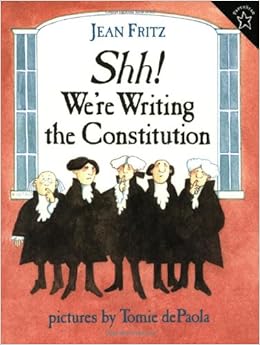
This week, we are starting Shh! We’re Writing the Constitution by Jean Fritz.  The book is a great story about how the Constitution was written during the summer of 1787.  The Framers are brought to life and are described as real people.  The events are written in a way that fifth graders can understand.  This is the sixth year that I have used the book with my group of fifth graders, and every year they seem to like the book, but most importantly, they remember the history!

I start by dividing the book into five sections.  The content is so rich, that the shorter sections allow us to really dive in and understand the story each day.  We read and discuss the book together and they complete comprehension questions each day.

At the beginning of the week, I also hand out a Spelling Activities page for the kids to use during the week.  There are only 12 words, but the kids are also required to learn their meanings, so 12 seems like plenty!

Once we finish the book, we review by completing a fill-in-the-blank summary of the story and by watching the video.  The video is available on YouTube here.  The video is basically a reading of the story with the illustrations in the background, but it provides a good review of the story.

I finish up the mini-unit on this book with a short quiz on the material.

This weekend, I’ve been cooped up working on school work, and I put together all of the materials I’ve created to use with the book into one packet of activities.  I even managed to get it posted on TPT!  If you’d like to check it out, it’s available here.
 

Blending Fiction and Nonfiction to Improve Comprehension and Writing Skills

Sunday, December 12, 2010

This lesson plan (from the ReadWriteThink website) uses a text set that pairs fiction and nonfiction texts covering a similar topic. The combination leads to increased interest and understanding because the student is able to find some familiarity with the format of fiction, and but also explore more detail with the nonfiction texts. The lesson also provides a look at using a stapleless book, a comic creator, and a letter generator, all of which are interactive computer tools that increase students interest level by adding a technology component.

To try the technology components with a different lesson, I’ve linked them below:
Stapleless Books (link)– this tool provides an opportunity for students to select a format for each page of the book, type in the text they want to include, and print the final copy. Pictures can be added by drawing after they are printed. There are even directions to show how to fold and cut the paper after it is printed to create the final book.
Comic Creator (link): This tool allows students to create 1, 2, 3, or 6 paneled comic strips. The characters, settings, and props that are available to add are limited, but this could still be a fun tool to try.
Letter Generator (link): This tool may be my personal favorite. It starts with a personalized letter to the student explaining reasons that you might want to write a letter and introducing how the tool will work. There is also an audio button available if the students need the letter read to them. The tool then highlights the parts of a letter and the purpose of each before advancing to the next screen where students have to pick either a friendly letter or business letter format. As students move through the tool, very specific directions lead them through the steps of setting up the letter while highlighting that part in a drawing of the letter at the side. After the entire letter has been written, the student can choose a border decoration (or none) to be added, preview the letter, and then print it. An option to print envelope instructions is also available. This tool could have MANY practical uses within the classroom!
 
◄Design by Pocket